New multiplayer game
Game manual
Reading the manual is not needed to play the game at all. But it is here just for completeness.- Playing and winning
- Winning
Your goal is to conquer the entire world of Zyr. To do so you must destroy all other empires.
To destroy another empire you most take its capital. You can identify an empire's capital by this crown .
.
Once a capital is taken, their entire empire (or what is left of it by then) will be yours.
The other way to win is by conquering 150 area's this will make all remaining empires admit they can not defeat you and they will surrender.
- Turn based
A game consists of multiple turns, during a turn a player can give orders to his armies and area's which will then be processed after pressing the "End Turn" button.
Your opponents will have done the same, and all commands of that turn will be processed simultaneously. The results of previous turn will then be pressed and you can enter the orders for a new turn again. - Getting the upperhand
All empires will be recruiting troops at conquer new area's. The trick is to use the right troops in the right place and time.
Each of the 50 unit type has tends to have combat bonusses for certain terrain types and sometimes for certain seasons too.
By using the right troops for the terrain you will have a major advantage in battle.
But beware some unit types may also be extra weak in certain terrains or during certain seasons.
As each area can only contain 1 army at a time and each army must consist of the same unit type, you should plan the routes for your armies well to prevent fighting in terrain you are at a disadvantage. - Statistics and messages
Above the world map on the left of the menu bar you have the season icon. It obviously shows what season it is and in the center you can see what turn number it is.

By clicking the season icon you can also see the statistics and messages for the current turn
Starting at turn 4 it will also show a comparative graph with the area's controlled by each empire.
- Starting a new game
- Single player
To start a single player game is easy. Just hit the button above this manual.
A new game will start with you against 5 computer opponents.
The positions of your capital will be determined randomly and 2 bordering imperial area's will be added.
Note that computer opponents can start with 1 more bordering imperial area. - Multiplayer
The multiplayer game option is to enable you to play Conquest of Zyr against your friends.
A multiplayer game has room for 11 players, either human or computer opponents. With a minimum of 2 human players.
To start the game you need to fill in email address for all those joining the game.
An email will be send to each player containing their gamecode for this game
The address won't be used or stored in any other way, so you can even use sites like 10minutemail.com if you are uncomfortable leaving your real mail address.
The other options to configure while creating a multiplayer game is the maximum time players have between turns.
If a player hasn't submitted a turn before that time ends that turn will be done by the computer.
Ofcourse it will take some time to get all players ready for a new game, therefor you can set a date at which the first turn will be processed on. (up to 2 week in the future)
- Gamecodes and continue and old games
When you start either a single or a multiplayer game a gamecode will be give to you. This gamecode identifies you as the player of a specific empire in a game.
In multiplayer the gamecode will be mailed to you. But you can also see the gamecode in the message at the first turn, and it will be in the url when playing (after ?game=).
If you interrupt a game for whatever reason, or in the case of multiplayer you wish to perform your next turn, you can input this code under "Continue game" and the game will continue
Note that in the case of a single player game an unfinished game will be kept for 8 days. A finish game or a new single player game with no turns done at all will be removed alot sooner though. - Continue games on IP
When creating a new single player game, the IP-address used will be stored with the game. If you at a later date wish to continue that game while having the same IP-address you can continue that game without a gamecode.
- Movement mode
- Moving an army
To move an army press the "movement mode" button. The map will now show all your area's in your color (in single player this is red), and all your troops will have a white background and in black numbers above the image the amount of men in the army. Enemy troops have a black background with white numbers.
When you click on an area of your empire on the map all bordering area's will be shown with a white outline.
If the area contains an army you can now click on one of the outlined bordering area's. An arrow will be shown to which area the unit will move to next turn.
When the turn is processed the army will attempt to move to this area.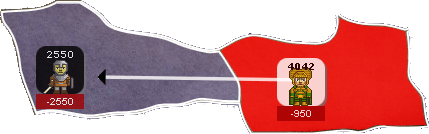
The red box under the army shows the estimated losses resulting from this move. More info about those under "How combat is resolved".
When clicking on either friendly or enemy army a box showing info about the unit type the army consists of. More info about those under "How combat is resolved".
- Small armies moves first
At times there may be multiple units moving towards the same area. To determine who moves and fights first the game checks the size of the army (how many men are in it, not it's modified strength).
The army with the least men in it will both move and fight first. (with the small exception of collisions where 2 armies move directly towards each other, see "Can a move fail" - Can a move fail ?
A unit will almost always move to the appointed area, but there are a few exceptions:- - Friendly armies blocking
Each area can only contain 1 unit type. So if an army tries to move to an area already containing a friendly army of a different unit type it won't move there.
If an army moves to an area containing a friendly army of the same unit type it will move there, unless the combined army would become over 10.000 men
Note: When moving to an area with a friendly army while that friendly army is succesfully moving away in the same turn or is being defeated by an invading enemy, that your move will succeed.
- - Collisions with hostile army
If your army moves to a hostile area and the army in that area moves to the exact same area your army comes from they will collide.
In the case of a collision the armies will fight in the area of the largest (slowest) army. Neither army will move after that. This may result in an army not moving to the designated area.
In the example below the battle will be fought in the red area and the white unit will remain in the red area. Because the black army is smaller than the white army.

- Cutting of area's and attrition
Area's of an empire that are no longer connected to their capital through other empire area's are cut off. These area's will rebel and leave the empire, unless there is still an army of that empire in that area.
Also armies cut off from their capital will suffer 10% attrition losses due to lack of supplies each turn. - Conquering imperial lands and capitals
When you take one of the starting area's of another empire that area will no longer recruit imperial legions but will switch back to their native unit type.
Even when retaken by the original empire again the area will not recruit imperial legions again.
Taking the capital of another empire causes that empire to collapse:
- - All remaining area's in that capital become part of the empire that took their capital.
- - The area that contained the capital will become an imperial area for the invading empire, meaning it will recruit imperial legions and will generate more towards recruitment points than a normal area.
- Combat
- Combat result predictions
When you move your army towards a hostile army the game will show you the estimated losses of this battle.
Although these estimates are quitte precise they do not calculate the possibility of the army moving away and another enemy army taking its place. Or situaties where your enemies moves towards you in which case the battle might be fought on different terrain.
The other thing not shown is the losses fighting with the local militia's (if any). As the size of the militia is equal to the amount of recruits in the hostile area, a number unknown to you, it can not be calculated.
- Combat strength
To calculate the losses both armies when resolving a combat the following modifiers are applied:- - Primaiy terrain
As show in the image below a unit type can have up to 5 bonus stars per terrain type . These are obviously only applied when the battle is fought in that terrain.
The black circles with the red stripe are negative modifiers .
.
Note: a single negative modifier has a greater effect than a single positive modifier. Armies caught in combat while having a negative modifier tend suffer massive defeats.
- - Secondary terrain
Besides a primary terrain each area also has secondairy terrain. This is taken into account for combat too but it's effect is only half as strong as primary terrain. When both primary and secondary terrain are the same, both modifiers are still applied and will add up.
To check both the primary and secondary terrain of an area press the "Terrain mode" button.
- - Season
These modifiers work the same way as terrain but are based on the current season.
- - Fortifications
Players can put up a fortification in an area containing an army. That army can not move while it is fortified but the fortifications will give it a strong bonus in combat.
For more info see "Fortify mode".
- - Outnumbering opponent
Modifiers are given to an army outnumbering the army it attacks.
Bonusses are added for x2,x5 and x10 more men than the opposing army.
- Determining Terrain (Terrain mode button)
At times you may be unsure what terrain a certain area is then press the Terrain Mode button.
This will show the terrain for each area:
- -The background color of the area determines the primary terrain (also written in text on the area).
- -The background color of the text block determines the secondary terrain.
By clicking on an area in Terrain Mode the popup will open and show both primary and secondary terrain type.

- Reviewing battles (Review battle button)
To see where battles have been fought on the previous turn press the "Review Battle" button.
In area's where there was combat a icon will be shown. the color behind the icon means:
- -White The battle was won by you.
- -Black You lost this battle.
- -Grey This was a battle you were not involved in, but was fough close enough to your borders that you still get a report for it.
 In this example your army of 6761 Snake Priests has invaded an area of the blue empire defended a by skeleton legion of 2300.
The skeletons are defeated and your Snake Priests have lost 2251 men. After that your Snake Priests continue to conquer the area and have to fight the local militia.
The size of a militia is based on the amount of recruitable troops in the area, as they are poorly armed and organised militia's have to fight with a harsh negative modifier.
In this case the militia consists of 450 Sand Golems, and they are defeated by your remaining 4510 Snake Priests. The Snake Priests only lose 19 men defeating the miltia
- Recruitment mode
- Recruiting
If you have free recruitment points avaible you can decide to gather more troops using recruitment.
Press "Recruitment Mode", the map will show with the white icons how many recruits and of what unit type you have avaible in each area of your empire.
It will also show all the unit types all the other area's on the map can recruit in black.
By clicking on a area the popup will show you the info about the unit type for that area. When clicking on an area of your own this is seen as an order to recruit troops there. Recruiting troops in an area will cost 1 recruitment point which will be deducted at the bar.

Area's with an order to recruit troops will remain highlighted in recruit mode. To cancel the order, just click the same area again.
When recruiting troops make sure the area does not contain any troops at the end of the turn or the order will be cancelled and your recruitment point wasted.
Armies of the same unit type as the area is recruiting can remain without problems as long as their combined force will never exceed 10.000 men.
Avaible recruits of area's that are being invaded by hostile forces will form a militia to defend the area. Being poorly armed and organised you best not expect too much of them, wear down armies going for deep strikes into your empire.
Note: The amount of recruits avaible in an area will never exceed 5000, but no matter how many of few troops you recruit in a single area it will still cost just 1 recruitment point. - Gaining recruitment points
Each turn your empire can receive recruitment points. The amount of recruitments points received is based on how many area's your empire controls compared to the sum of all the men in all your armies.
The bigger your empire the more troops it can support, if you got a large empire with only a few small armies you will gain recruitment points fast. On the other hand a greatly dimished empire that still has large armies will not gain much recruitment points.
To give an indication, each area can maintain approx 500 men. But some area's can maintain more, and some troops require less maintenance, see Special imperial units and area's.
Recruitment points can be spend on either recruiting troops or fortifying armies. You can never lose unspend recruitments points, and you will always gain at least a little progress towards a new recruitment point. But once you have 10 unspend recruitment points you can not gain any more and all gain will be wasted. - Seasons and recruitment
The gain in possible recruits is the same for each area but differs per season.
At the start of each season area's gains 50 recruits, except for spring when area's will gain 300 recruits. - Special imperial units and area's
The starting area's of your empire are special:- -Your capital recruits Imperial Guards, this unit type is special in that they cost no maintenance when calculating recruitment points.
This means that you can have a large army of Imperial Guards while still gaining recruitment points if that army wasn't there.- -Your other imperial area's generate more towards recruitment points than a normal area would. Also these area's recruit Imperial Legions that only cost 60% of the maintenance another army of that size would.
- Fortify mode
- Creating and removing fortifications
By pressing the "Fortify Mode" button the map will show with the primary terrain type as background for the area's and your armies in white.
By clicking on an area with an army the popup will show you the info about the army and set the order to fortify/unfortify the army in that area. Either fortifying or unfortifying an army in an area will cost 1 recruitment point which will be deducted at the bar.
- Effects of fortifying
An army fortified get a large combat bonus, but can no longer move until either defeated or unfortified.
Area's conquered by a hostile empire will lose their fortifications.

- Terrain mode
- Primary terrain
When in terrain mode the background color of an area indicates the primary terrain type. Also the text in the textbox of the area show the primary terrain type.
The primary terrain type can have a great effect on armies fighting in that area. - Secondary terrain
The secondary terrain type is in the background color of the textbox in an area.
The secondary terrain type has about half as much effect compared to primary terrain type on armies fighting in the area.
Clicking on the area will show both secondary and primary terrain type
- Review battle mode
- Reviewing battles
To see where battles have been fought on the previous turn press the "Review Battle" button.
In area's where there was combat a icon will be shown. the color behind the icon means:
- -White The battle was won by you.
- -Black You lost this battle.
- -Grey This was a battle you were not involved in, but was fough close enough to your borders that you still get a report for it.
In this example your army of 6761 Snake Priests has invaded an area of the blue empire defended a by skeleton legion of 2300.
The skeletons are defeated and your Snake Priests have lost 2251 men. After that your Snake Priests continue to conquer the area and have to fight the local militia.
The size of a militia is based on the amount of recruitable troops in the area, as they are poorly armed and organised militia's have to fight with a harsh negative modifier.
In this case the militia consists of 450 Sand Golems, and they are defeated by your remaining 4510 Snake Priests. The Snake Priests only lose 19 men defeating the miltia
Enter the gamecode of the game you wish to continue.
Active single player games started from your current IP
| Status | Last played | Turn |
|---|